Scam Emails Pretending to Be Your Web Designer: How to Spot Them and What to Do
Over the past few months, several of our clients have received emails that look like they came from Links Web Design. They didn’t. They came from scammers who copied our company name, our logo, our street address, and the name of someone on our team, then sent the message from a free Gmail account.
This kind of attack is called vendor impersonation. Instead of pretending to be a bank or a delivery company, the scammer pretends to be a business you already work with and trust. Web design companies are an easy choice, because most websites say who built them right in the footer.
We want every business owner to recognize these emails, whether you work with us or with another web team. Below we walk through what the messages look like, why they work, how to respond, and what to do if you have already replied or paid.
What These Scam Emails Look Like
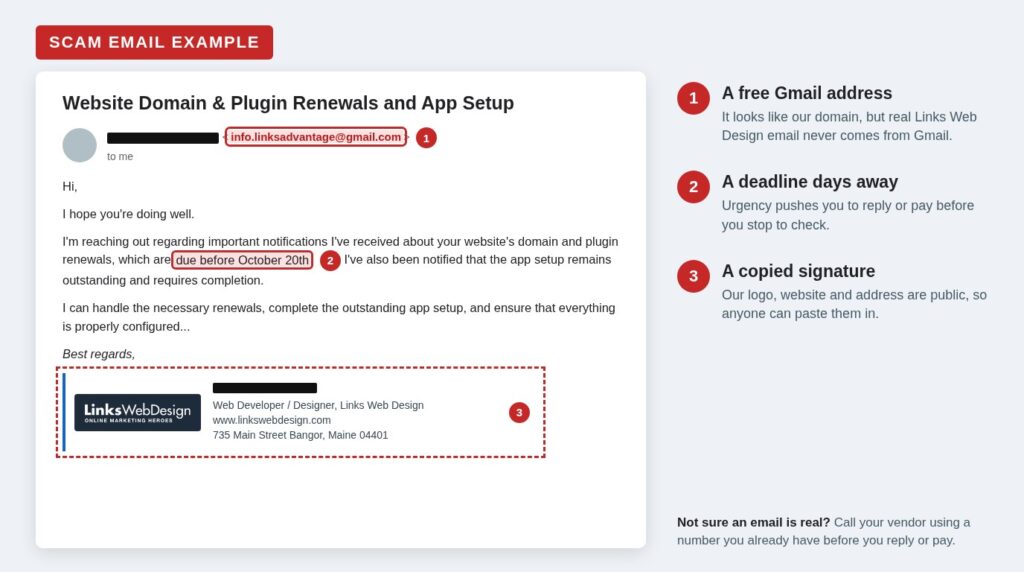
One recent wave arrived with the subject line “Website Domain & Plugin Renewals and App Setup.” The message is short and polite. It says the sender has “received important notifications” that your domain and plugin renewals are due before a specific date, usually just a few days away. It adds that an “app setup” is still outstanding, and warns that missing the deadline could take your website offline or hurt your search rankings. Then it offers to take care of everything if you reply.
The signature is the convincing part. It includes our logo, our company name, our real website address, and our Bangor office address, along with the name of one of our developers. It even ends with a long legal confidentiality notice, which makes it feel official.
What it doesn’t have is a real Links Web Design email address. It was sent from [email protected], a free Gmail account set up to look like our linksadvantage.com domain.
An earlier wave in August used the same approach with a different pitch. Those emails came from Gmail addresses using the names of people on our team and pushed an urgent “CMS and website review.”
A Second Version: The Fake Website Review
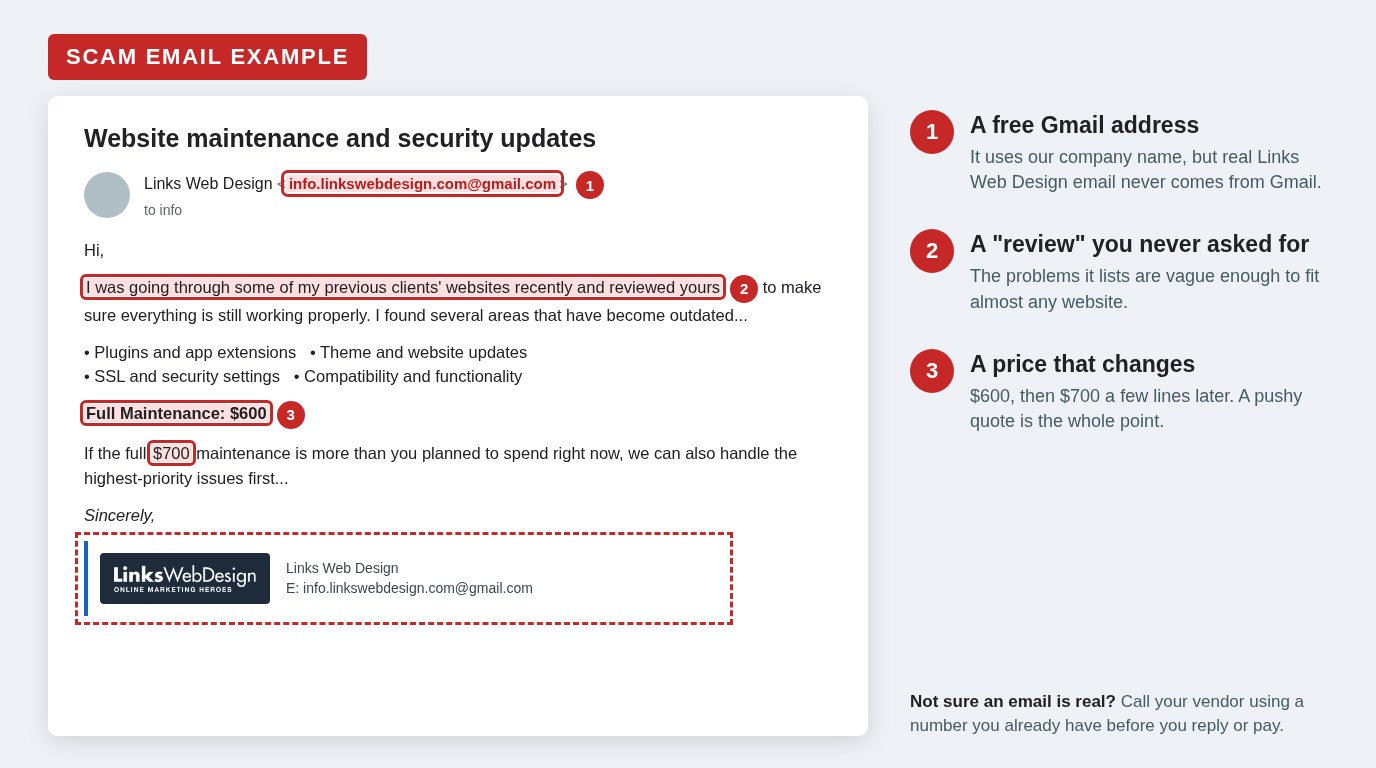
A few days later, another version arrived with the subject line “Website maintenance and security updates.” This one comes from “Links Web Design” at [email protected]. It says the sender was going through past clients’ websites and reviewed yours, then lists problems that sound technical but could apply to almost any website, such as outdated plugins, theme updates, SSL and security settings, and compatibility issues.
It ends with a price for “full maintenance” and offers to start with the “highest-priority issues” if that is more than you planned to spend. The price even changes partway through the email, from $600 to $700. Mistakes like that are common when scammers copy the same message to many businesses.
Why the Scammers Ask You to Reply
These messages rarely include a link or an attachment, which helps them get past spam filters. The goal is to start a conversation. If you reply, the next email usually asks for a payment by card, wire transfer, gift card or payment app, or asks for login details to your domain or website so the “renewal” can be completed. Either way, the money or access goes to the scammer.
Why These Scams Work
These emails work because they borrow trust you have already built with a real vendor. A few things make that easy for scammers.
Most of the Details Are Public
Your website’s footer credit, your web company’s team page, LinkedIn profiles and online reviews tell a scammer who builds your website and who works there. Our office address is on our website. None of that is a security problem by itself, but it gives a scammer everything they need to write a believable signature.
Email Signatures Are Easy to Copy
Free email signature tools let anyone upload a logo and type in a name, title and address. Gmail accounts are free and take minutes to set up. A scammer can build a signature that looks identical to a real one in less time than it takes to read this article.
The Message Sounds Routine
Domains and plugins really do renew every year, and most business owners don’t track the exact dates. A note about upcoming renewals sounds like ordinary housekeeping, not a threat. That is exactly why it works.
The Deadline Rushes You
A deadline a few days away pushes you to act before you stop and check. Urgency is the most common tool in almost every scam, and this one is no different.
Warning Signs to Look For
Any one of these is reason to stop and verify before you respond.
- The sender uses a free email service. A real business vendor writes from its own company domain, not Gmail, Yahoo, Outlook.com or AOL. Look at the actual address, not just the display name, since anyone can set the display name to anything.
- The address is a near match. Scammers often fit the real company name into a free address, such as [email protected], or register a domain that is one letter off.
- There is a short deadline. “Due before October 20th” or “within 48 hours” is meant to rush you.
- You get a price quote you never asked for. A message that says someone “reviewed” your website, lists vague problems and quotes a price is a red flag. A web team you already work with will talk with you before quoting work.
- The details are vague. Real vendors refer to specifics, such as which domain, which plugin, the invoice number, or the amount. Scam emails talk about “notifications I’ve received” without saying what they are.
- The greeting is generic. A team you work with regularly will usually use your name.
- It asks for payment or logins over email. Be especially careful with requests to pay by wire, gift card, or payment app, or to send passwords.
- Something just feels off. A new contact, an unusual request, or a tone that doesn’t match past emails is worth a phone call.
How to Respond If You Receive One
If a message like this lands in your inbox, the safest response is simple.
- Don’t reply, click, or pay. Replying confirms that your address is active and invites a follow-up request for money.
- Verify with your vendor directly. Call or email them using contact details you already have, such as a past invoice or their website. Never use the phone number or links in the suspicious email itself.
- Report it as phishing. In Gmail, open the message, click the three dots next to Reply and choose “Report phishing.” In Outlook, choose Report and then Report phishing. This helps the email provider block the sender for everyone.
- Report the Gmail account to Google. When the scam comes from a Gmail address, Google can shut the account down. Use the Gmail abuse form at support.google.com/mail/contact/abuse.
- Let your staff know. If one person at your business received it, others probably did too. A quick heads-up keeps someone else from replying.
- Delete the message once you have reported it.
If You Already Replied, Clicked or Paid
Please contact us right away at 207-947-4313 or [email protected], and we will help you work out what needs to be done. The sooner we hear from you, the more we can do. If you work with a different web company, contact them the same way, using contact details you already have rather than anything in the suspicious email.
How to Protect Your Business Going Forward
A few habits make vendor impersonation much less likely to succeed.
Set a Simple Verification Rule
Make it a policy that any new payment request, change in payment details, or request for login information gets confirmed by phone, using a number you already have on file. One quick call stops most of these scams cold.
Know Your Vendors’ Real Email Domains
Keep a short list of the companies you pay regularly and the email domains they use. If a message about your account comes from anywhere else, treat it as suspicious until you have confirmed it.
Train Your Team
Share examples like the one in this article with your staff, especially anyone who pays bills or manages your website. People who know what these emails look like are far less likely to fall for them.
Use Strong Sign-In Protection
Turn on two-factor authentication for your email, domain registrar, hosting, banking and website logins. Where it is offered, a passkey or security key is the best option.
Protect Your Own Domain
Email authentication records, known as SPF, DKIM and DMARC, make it much harder for scammers to send email that looks like it came from your own company domain. They can’t stop someone from using a look-alike Gmail address, but they protect your customers from the more convincing kind of forgery. Your web or IT team can tell you whether your domain has them set up.
How Links Web Design Will Contact You
So there is no doubt about what a real message from us looks like:
- Our emails always come from @linksadvantage.com, @linkswebdesign.com, or @linksmanaged.com addresses.
- We will never email you from Gmail or any other free email service.
- We won’t pressure you with a deadline a few days away or ask you to pay by wire transfer, gift card or payment app.
- We won’t email you a price for work you didn’t ask for. Any quote from us follows a conversation with you.
- If you’re ever unsure whether an email is from us, call us at 207-947-4313 before you reply or pay anything. We are always happy to check.
Frequently Asked Questions About Impersonation Scams
Is my website or email account hacked if I received one of these emails?
Usually not. These scammers find business email addresses on websites, directories and social media, then send the same message to many businesses. Receiving one doesn’t mean anyone has access to your accounts. If you replied or shared any login details, contact us right away.
How did the scammers know who built my website?
Many websites include a “website by” credit in the footer, and web design companies often show their client work and team members online. Scammers use that public information to pick a vendor you are likely to trust and to make their signature look real.
Why didn’t my spam filter catch the email?
These messages come from real Gmail accounts, are written in plain, polite language and usually contain no links or attachments. That combination looks like normal business email to most spam filters. Reporting the message as phishing helps the email provider recognize and block it.
What should I do if I replied but did not pay?
Stop responding and don’t send any payment or login details. Then contact us right away at 207-947-4313 or [email protected], and we will help you with next steps.
How can I tell a real renewal notice from a fake one?
A real renewal notice comes from your vendor’s company email address or from the registrar or software company directly, names the specific domain or product, and shows an amount. When in doubt, call your vendor using a phone number you already have and ask them to confirm before you pay anything.
How We Can Help
At Links Web Design, we manage websites, domains and hosting for businesses across Maine, Florida and beyond, and we keep an eye on the security issues that affect them. If you received a suspicious email that claims to be from us, or from any web company, forward it to us and we’ll tell you whether it’s real. If you would like help setting up email authentication for your domain or reviewing who has access to your website accounts, contact us.