How to Get Your Business Recommended by AI
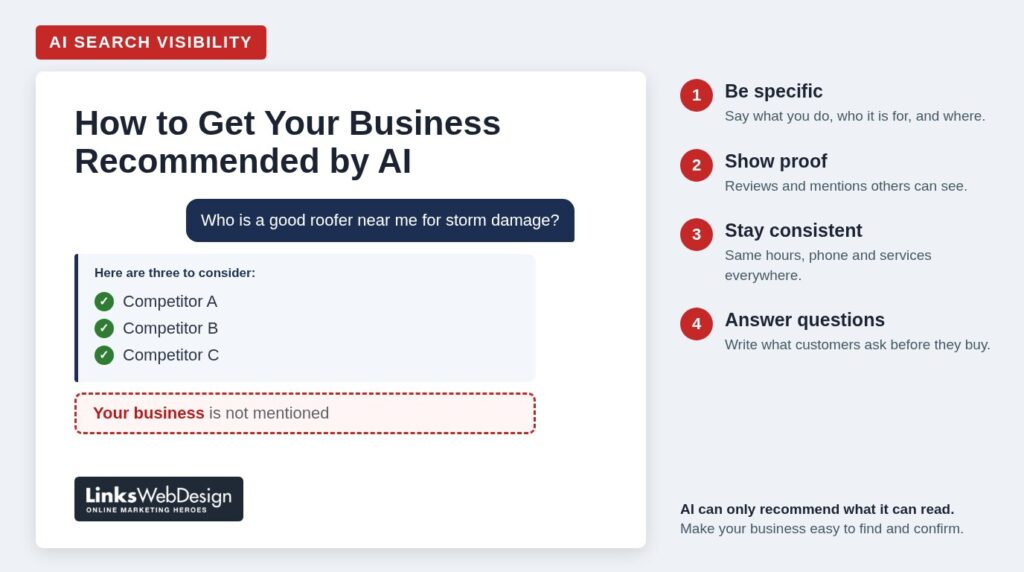
A few times a month now, a client tells me some version of the same story. They got curious, opened ChatGPT or Google’s AI Mode, typed in the kind of question their own customers ask, and watched it name three businesses. Theirs wasn’t one of them. Often one of the three was a competitor they know they outwork every day.
The next question is always “Why them?” This post is my full answer. The short version is that these tools can only recommend what they can find, read and confirm. The business that gets named is usually the one that is easiest to verify, which is not always the one that does the best work. The encouraging part is that most of what makes a business easy to verify is within your control.
Below I cover how AI tools gather their information, two side-by-side examples, four areas to work on with steps you can take this week, one technical setting worth checking, and a 15-minute test you can run on your own business.
Two things to know before you start. First, these steps can improve your chances, but nobody can guarantee that an AI tool will name your business. The companies behind these tools decide what appears in an answer, and they don’t take requests. Second, the results are not immediate. After you make changes, AI tools won’t pick up on them right away. They have to revisit your pages, your listings and your reviews first, and that can take days, weeks or longer.
An AI Assistant Is a Reader, Not a Judge
An AI assistant has never hired you, eaten at your restaurant, or sat in your waiting room. Everything it can say about your business comes from text it has read: your website, your listings, your reviews, and whatever other people have published about you.
That changes how you should think about the problem. Twenty years of doing right by customers is invisible to these tools unless it shows up in writing somewhere they can reach. When the information about a business is thin, vague, or contradicts itself, the assistant has very little it can say with confidence, so it moves on to a business it can describe clearly.
It also helps to know that these tools answer in two ways. Sometimes they answer from what they learned during training, which can be months or years old. More and more often, and especially for “who should I call” questions, they search the web while they write the answer. That second mode is good news for you, because it means what you publish and fix today can show up in answers once the tools have revisited your pages. You don’t have to wait for the next round of training.
Where the Answers Come From
There is no single “AI” deciding who gets recommended. Each tool gathers information in its own way, and the companies behind them have said different amounts about how it works. Here is what they have put in writing.
Google AI Overviews and AI Mode
Google’s AI answers are built on top of Google Search. In Google’s guidance for website owners, the company says a page needs to be indexed and eligible to appear in regular search results, and that there are no additional requirements beyond that. It also explains that these features may run several related searches behind the scenes to build one answer, which means they can pull from a wider set of pages than a normal results page shows.
Two details in that guidance are worth noting. Google recommends making sure your important content is available as text, and it recommends keeping your Google Business Profile information up to date.
ChatGPT
When ChatGPT searches the web, it relies in part on OpenAI’s own search crawler, which visits websites much like Google’s crawler does. OpenAI’s documentation says that sites that block this crawler will not be shown in ChatGPT’s search answers. OpenAI has not published a formula for how it chooses among the sites it can read.
Microsoft Copilot
Microsoft says Copilot requests information from Bing when web content would improve a response. Most business owners I talk to have never looked at how they appear in Bing. If Copilot is built into your customers’ work computers, that is worth a look.
Perplexity and Others
Perplexity searches the web and lists its sources next to each answer. That makes it a useful window into the process, because you can see exactly which pages shaped what it said about a business or a category.
None of these companies publishes a ranking formula, they don’t weigh information the same way, and all of them change often. That is why I don’t recommend chasing any one tool. The better plan is to strengthen the things every one of them reads: your website, your listings, your reviews, and what others say about you.
Two Examples
Two Roofing Companies
Picture a homeowner asking, “Who should I call about a roof leak after last night’s storm? I need someone who can work with my insurance company.”
The first roofer’s home page says the company provides quality roofing for residential and commercial customers. The services page is a list of single words. The Google Business Profile hasn’t been touched in three years and still shows an old phone number. There are a dozen reviews, and most say “Great job.”
The second roofer has a page about storm damage repair and another that walks through how an insurance claim works, step by step. The site names the towns the company serves. The business profile is current and lists emergency hours. The reviews say things like “They met with our adjuster” and “They had a tarp on the roof the morning after the storm.”
An AI tool can match the second company to every part of that homeowner’s question: the leak, the storm, the urgency, the insurance. The first company may well be the better roofer. Nothing online says so.
Two Accounting Firms
Now picture someone asking, “I’m starting a small landscaping business. What kind of accountant should I look for, and who is good near me?”
The first firm’s website offers “full-service accounting solutions for individuals and businesses.” That sentence could sit on any accounting website in the country.
The second firm has a page for new and small businesses. It has an article on what to bring to a first meeting and another on how to choose a business structure. It gives a price range for monthly bookkeeping. The firm appears in the state CPA society directory and the local chamber of commerce listing, and its reviews come from other small business owners.
Notice that this question has two halves. The second firm can be recommended in the “who is good near me” half, and its articles can also be the source the AI draws on for the “what should I look for” half. A business that teaches gets mentioned earlier in the conversation, before the customer has started comparing names.
Neither example comes with a guarantee. Being specific and consistent doesn’t force any tool to name you. It does give the tool something accurate to work with, and it helps the people who read your site directly, too.
Four Areas to Work On
1. Get Specific About What You Do and Who It’s For
- Give each main service its own page instead of one long list. On each page, say what the service is, who it’s for, what’s included, and where you offer it.
- Name the towns, counties or regions you serve in plain text, not only on a map image.
- Replace phrases any competitor could use, such as “quality service” or “customer satisfaction,” with facts only you can state: years in business, licenses, certifications, specialties, the brands you carry, the kinds of jobs you do most.
- Say who you are not the right fit for. A minimum project size or a type of work you don’t take on helps the right customers find you.
- Check that important details aren’t locked inside images or PDFs. If your price sheet or service menu exists only as a picture, add it as text.
2. Make Your Reputation Visible Outside Your Website
Your own website is you describing yourself. AI tools also look at what other people say, and so do customers.
- Ask for reviews steadily, not in bursts, and invite customers to mention what you did for them. Never script a review or offer anything in exchange for one.
- Reply to the reviews you get, including the hard ones. Our guide on how to respond to negative reviews covers that in detail.
- Get listed where your industry keeps its records: trade associations, licensing boards, your chamber of commerce, and the “find a dealer” or “find an installer” pages of the manufacturers you work with.
- Look for honest mentions close to home, such as local news coverage, event sponsorships, or an article you write for a trade publication.
Different platforms give these signals different weight, and none of them will tell you exactly how much. A business that is well reviewed and mentioned in the places its industry trusts is in a good position on all of them.
3. Keep Your Facts Identical Everywhere
When your hours on Google say one thing and your website says another, a person has to guess which is right. So does a machine, and it may decide a business with cleaner information is the safer one to mention.
- Write down the one correct version of your business name, address, phone number, hours and service list.
- Compare it against your Google Business Profile, Bing Places, Apple Business Connect, Facebook page, Yelp, any industry directories, and your own website’s footer and contact page.
- Remove services you no longer offer, add the ones you’ve started, and close any duplicate listings.
- Put a reminder on your calendar to repeat the check every quarter and before each holiday season.
4. Answer the Questions People Ask Before They Buy
This is where I see the most room for small businesses right now. People ask AI tools full questions, the same ones they would ask you on the phone. The businesses that have already answered those questions in writing are the ones the tools can quote.
- For two weeks, keep a running list of every question customers ask by phone, by email and in person.
- Write honest answers. Cover what things cost and what drives the price up or down, how long the work takes, what the process looks like, what can go wrong, and how to compare one provider with another.
- Use the customer’s wording, not your industry’s. If people ask “how much does it cost to replace a roof,” that is the heading.
- Put the answers where they belong: on the related service page and in a FAQ section. I wrote more about that in why every business website needs FAQs.
Content like this does two jobs. It gives AI tools something useful to cite, and it earns the trust of the person who reads it on your site and decides to call.
One Technical Check: Can AI Crawlers Reach Your Site?
Some security tools and firewall settings block AI crawlers, sometimes by default. That can be a reasonable choice, but it should be a choice. As noted above, OpenAI says a site that blocks its search crawler won’t be shown in ChatGPT’s search answers, and Google’s guidance asks you to make sure crawling is allowed by your site and your hosting setup.
Ask whoever manages your website to confirm which AI crawlers your site allows. The crawlers that power search answers are separate from the ones that collect content for training AI models, so you can allow one kind and decline the other.
A 15-Minute Self-Check
- Open two or three tools, such as ChatGPT, Google’s AI Mode, Copilot or Perplexity.
- Ask the way a customer would, without naming your business. Include the details real customers include: the town, the situation, the thing they are worried about.
- Ask about your business by name: “What can you tell me about [your business] in [your town]?” Check every fact in the answer.
- Look at the sources the tool lists. Those are the pages shaping what it says about you and your competitors.
- Write down what was wrong, what was missing, and which competitors appeared. That is your to-do list.
Answers vary from one person to the next and even from one try to the next, so treat this as a snapshot, not a score. Repeat it every few months and watch the direction.
Frequently Asked Questions
Can I pay to be recommended by AI?
Some platforms show ads alongside AI answers, and that area is changing quickly. I’m not aware of any that lets a business buy its way into the answer itself. Be cautious with anyone who guarantees you a recommendation.
Does this replace SEO?
No. Google says the same fundamentals apply to its AI features as to regular search, and the other tools lean on search results too. Clear pages, accurate listings and useful content help in both places.
Do I need special files or code for AI?
For Google’s AI features, Google says no new files or special markup are required. Other tools vary, and extras like these don’t hurt, but they are not where I would start. Start with what your pages say.
How long before changes show up?
There is no set timeline. Tools that search the web as they answer can reflect a change once your pages have been crawled again, which may take days or weeks. Reviews and outside mentions build over months. This is steady work, not a one-time fix.
AI already recommends my business. Do I need to do anything?
Check that what it says is accurate, especially hours, services and location. Then keep doing what got you there. Your competitors are reading articles like this one, too.
How We Can Help
At Links Web Design, we help businesses across Maine, Florida and beyond build websites that explain clearly what they do and who they serve. If you’d like a second set of eyes, we can review your website, your business listings, and how AI tools describe your business today, then give you a short list of what to fix first. Contact us to get started.